
BART operates parking at 35 stations. These Frequently Asked Questions (FAQs) are specific to BART-operated parking, and do not apply to parking at the Berryessa/North San Jose and Milpitas stations, which are operated by the Santa Clara Valley Transportation Authority.
Please read BART Parking's Terms & Conditions for official parking rules.
General Parking Questions
- How do I pay for BART parking?
- How much does parking cost at BART?
- Do I need to pay for parking in an ADA stall?
- Where do I park at BART?
- How long can I park my vehicles at BART?
- Can I park an oversized vehicle at BART?
- What are the BART parking holidays?
- I got a parking ticket, what should I do?
- How does BART validate faregate entry for parkers who are using contactless payment?
- Why can't I use Clipper to pay for BART parking?
- How do I pay for BART parking with commuter benefits?
Official BART App & Account Questions
- What is Tap and Go parking?
- How do I add a license plate to my BART parking profile?
- Why did my BART parking payment fail?
- I paid for parking for the incorrect station; can you change it?
- How do I get a refund for my BART parking?
- How does the BART Parking Wallet work?
- How do I close my official BART app account?
- How do I close my EZ Rider parking account?
Reserved Parking Questions
- Where do I park at BART when using Reserved parking?
- Do I need to display a permit when using Reserved parking at BART?
- Do I need to pay for Reserved Parking for the first day of my reservation, if I arrive after 3pm?
- How do I cancel Reserved parking?
- Can I purchase monthly reserved parking for a future month?
- When will I be charged for monthly reserved parking?
- What happens if my payment method fails? Will I lose my monthly reserved parking at BART?
- Can I split my monthly reserved parking payment across two payment methods?
- Can I use my monthly reserved parking at a different station?
- I am outside of the country; how do I extend my BART Parking reservation?
Other BART Parking Questions
- The parking machine at BART is not working and I am unable to pay for parking; what do I do?
- The BART app is not working and I am unable to pay for parking; what do I do?
- Does BART offer discounts on parking?
General Parking Questions
1. How do I pay for parking at BART?
Pay for Daily parking using credit/debit, Venmo, or PayPal on the official BART app or website or with credit/debit or cash at the machines inside the station (after entering the fare gates; remember your stall number).
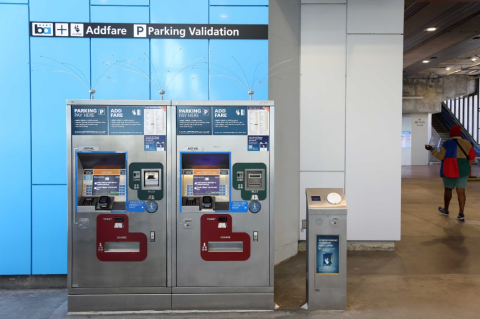
Example of parking payment machines inside the station after entering the fare gates.
Pay for Reserved parking (Single/multi-day, Monthly) in advance using credit/debit, Venmo, or PayPal on the official BART app or on the parking website.
2. How much does parking cost at BART?
Daily parking is $3.40 at most BART stations, but it varies by station. Check the parking pricing page to see the prices at each station. Parking is free after 3pm Monday to Friday, on weekends, and official BART parking holidays.
3. Do I need to pay for parking in an ADA stall?
Yes, parking payment is required Monday – Friday, 4am – 3pm (except on BART holidays). Pay for Daily parking if parking for no more than 24 hours, pay for Reserved Parking when parking for multiple days at a time.
4. Where do I park at BART?
Park in the Daily area if you are purchasing Daily parking (available on the official BART app, website or inside the station). Park in the Reserved area if you are purchasing Reserved (Single/Multi-day, Monthly) parking.
Parking maps by station, along with prices, are available here.
5. How long can I park my vehicle at BART?
If you are purchasing Daily parking or Monthly Reserved parking, you can only leave your vehicle parked for one day at a time, except for weekends and official BART parking holidays, where you may leave your vehicle continuously and payment is not required.
If you would like to leave your vehicle consecutively overnight (like while traveling), please purchase Single/Multi-day reserved parking on the official BART app or website, which allows you to leave your vehicle for up to 20 paid weekdays at a time (weekends and BART holidays are free and excluded from the 20 weekdays) when riding BART to and from your destination.
6. Can I park an oversized vehicle at BART?
Vehicles or combinations of vehicles that exceed 6.5 feet in width, or 19 feet in length or 3 tons in weight may not be driven through, left standing or parked in any BART parking facility. Height restrictions differ by parking garage. Vehicles found in violation of the size restrictions may be cited or towed.
7. What are the BART parking holidays?
Parking is not enforced on the following holidays:
- New Year's Day (January 1)
- Martin Luther King Jr. Day (third Monday of January)
- Presidents’ Day (third Monday in February)
- Memorial Day (last Monday in May)
- Independence Day (July 4)
- Labor Day (first Monday in September)
- Thanksgiving Day (fourth Thursday in November)
- Christmas Day (December 25)
Holidays are observed on Monday if it falls on a Sunday, and on Friday if it falls on a Saturday. Observed holidays may be different on a year-by-year basis.
8. I paid for BART parking. Why did I receive a citation?
A few reasons that may have resulted in receiving a citation:
- Incorrect or old license plate listed in your account. Confirm your license plate is correct.
- Paying for the incorrect station on the app. Confirm you paid for the correct station.
- Paying for the incorrect stall number inside the station. Confirm you paid for the correct stall number.
- Parking in the incorrect area. Make sure to park in the designated Daily and Reserved areas.
- Please also ensure you pay for parking no more than 10 minutes after entering the faregates.
Please visit BART’s citation page for information on how to pay or appeal your citation. Provide proof of payment, if available, and a short explanation with your appeal to help expedite the process. You may continue to monitor the status of your appeal on the citation processing site and will also receive a response by mail to the address provided in the appeal. Please allow a couple weeks for your appeal to be processed.
9. How does BART validate faregate entry for parkers who are using contactless payment?
With the introduction of contactless payment option for BART fare, we are not requiring Clipper validation for parking at this time. Those using contactless payment will not be ticketed as long as they have paid for parking through the app, website, or inside the station. To pay on the app, please enter any 10-digit number int he Clipper Card field.
Use of BART parking by non-BART riders will be enforced in constrained parking areas through spot checks. BART Police will monitor the lots for those who are not entering the system but have arrived and parked. Or those who enter the system to pay for parking and then leave to then get on a shuttle.
10. Why can’t I use Clipper to pay for BART parking?
Clipper is a regional transit card managed by the Metropolitan Transportation Commission and does not currently support parking payments.
11. How do I pay for parking at BART with commuter benefits?
Obtain a commuter benefits card from your commuter benefits provider and use that card to pay for parking. We do not accept any other forms of commuter benefits payment. If your provider does not offer a card, you will still have the option to pay out of pocket and request reimbursement from your benefits provider. Ensure that your funds are set to "Parking" in your commuter benefits portal to avoid any declined transactions. "Transit" funds will not work.
Official BART App & Account Questions
12. What is Tap and Go parking?
The "Tap and Go" parking feature allows you to pay for parking with one tap from the official BART app home screen. To enable, create an account first if you do not already have one and follow our Tap and Go step-by-step guide here.
13. How do I add a license plate to my BART parking profile?
See guide for how to add a license plate on the app. You can also add a license plate or manage license plates on your account on the parking website. You can have up to five license plates listed in your account but may only have one vehicle parked at a time. Each person should have their own account with their own vehicle listed in their account. Each parked vehicle needs to have a payment in the system. Two payments can’t be made for two vehicles under the same account on the same day. If the system detects more than one vehicle parked, and only one payment was made, any additional vehicles will be marked as unpaid and will be cited.
14. Why did my BART parking payment fail?
There are a few common reasons why your payment may have failed:
- Outdated Payment Method: Ensure that all your information is accurate and up to date. This includes card #, expiration date and security code.
- Commuter Card Funds: Ensure that your commuter card has sufficient parking funds. If you have monthly parking, ensure these funds are available before the 15th of each month when your monthly Reserved parking is scheduled to be renewed. Your funds must be set to "Parking", if your funds are set to "Transit", the transaction will be declined.
- Bank Declining Charge: Please contact your bank to ensure they are not declining the transaction for processing.
- Multiple Declines: If the system detects 5 declines, all attempts after that will be automatically blocked and declined for security reasons, even if your payment method is updated. After 5+ declines, please wait at least 30 minutes to make another attempt to pay for parking.
If your payment is still failing after confirming all of the above, please contact us for assistance at bart.gov/comments.
15. How does the Parking Wallet work?
When you enable Tap and Go or use the "Pay by Wallet" option under Daily Parking for the first time, the app will load your parking wallet with $25. The daily fee will be deducted from your balance every time you pay for parking using Tap and Go or "Pay by Wallet" under Daily parking. The parking wallet will then reload $25 every time the balance falls below $5.
To pay for just one day of daily parking without loading your parking wallet, use the “single payment” option. If you accidentally loaded your parking wallet or no longer wish to use it, contact us to request a refund.
16. How do I get a refund for my parking?
You can receive a refund for your parking wallet balance by clicking “Refund Wallet” on the app or website.
For all other refund requests, please contact us at bart.gov/comments and provide the email associated with your account, the payment you need refunded and the reason for the refund request.
17. How does the Parking Wallet work?
When you enable Tap and Go or use the "Pay by Wallet" option under Daily Parking for the first time, the app will load your parking wallet with $25. The daily fee will be deducted from your balance every time you pay for parking using Tap and Go on your home scree or "Pay by Wallet" under Daily parking. The parking wallet will then reload $25 every time the balance falls below $5.
To pay for just one day of daily parking without loading your parking wallet, use the “single payment” option. If you accidentally loaded your parking wallet or no longer wish to use it, you can request a refund directly in your account by clicking “Refund Wallet”.
18. How do I close my official BART app account?
Click the profile icon in the upper right hand corner of the app, and select "Delete Account", then confirm by clicking "Delete". Any active reservations and remaining wallet balance will be cancelled and refunded to you as part of the account closure process.
19. How do I close my EZ Rider account?
Log in to your BART EZ Rider Parking Account on the EZ Rider website and click on "close your account" and enter the reason for closure. Please make sure your credit/debit card is current as the refund will be credited to the credit/debit card on file. The remaining balance on your account will be refunded to the credit / debit card on file within 24 - 48 hours once we receive the request.
Reserved Parking Questions
20. Where do I park at BART when using Reserved parking?
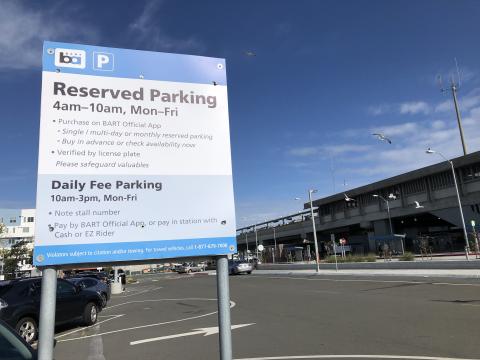
Park in the Reserved area (previously referred to as “Permit” area) when using monthly or single/multi-day Reserved parking. Parking area maps are available on the station pages and the parking pricing page. If the Reserved area is full when you arrive, please park in any open Daily spot. Reserved signs are blue + white or yellow.
Example of Reserved parking signage:
21. Do I need to display a permit when using Reserved parking at BART?
No, you do not need to display a permit or hangtag. You do need to register your license plate on your account so BART knows that your vehicle has paid for Reserved parking. List up to 5 vehicles but only park 1 vehicle at a time.
22. Do I need to pay for Reserved Parking for the first day of my reservation, if I arrive after 3pm?
No, you do not need to pay for Reserved Parking for the first day of your reservation if you are arriving after 3pm (when parking is free). You can still leave your vehicle parked in the Reserved area.
23. How do I cancel Reserved parking at BART?
You may cancel your reservation on the official BART app or the parking website by clicking on the “cancel” button next to where your active reservation is shown. For single/multi-day parking, you may cancel up to 11:59 p.m. on the night before the reservation. You can elect to cancel the entire reservation or only specific days. You will be assessed a $2 fee for each cancellation action, and the refund (minus the fee) should appear on your payment method within 72 business hours. Please note that the transaction cannot be cancelled until it has been settled with your bank, which can take up to 24 hours. Should you not be able to cancel, please contact us by email before your reservation date and we will cancel on your behalf.
24. Can I purchase monthly reserved parking to start on a future date?
No, your monthly parking starts as soon as you purchase it.
If you want to reserve parking for specific days in the future, purchase single/multi-day reserved parking up to 60 days in advance from the last day of your reservation.
25. When will I be charged for monthly reserved parking?
Monthly reserved parking charges occur on the 15th of every month for the following month, regardless of when you first purchase it. If you sign up before the 15th of the month, you will be charged a prorated amount to cover the remainder of that month. Then, on the 15th, you will be charged the full fee for the following month. (Example: if you sign up on April 10th, you’ll be charged for April 10th–30th on that day, and then on April 15th, you’ll be charged for May 1st– 31st). If you sign up on or after the 15th of the month, you will be charged the prorated amount for the remainder of the month plus the full fee for the following month. (Example: if you sign up on April 20th, you’ll be charged for April 20th–30th plus May 1st–31st).
26. What happens if my payment method fails? Will I lose my Monthly Reserved parking?
Your primary payment method will be charged on the 15th of each month. If this fails, you will receive an email notification asking that you correct the issue. You have until the 24th of the month to correct the issue or enter a new payment method. On the 25th, a second attempt will be made to charge your primary and secondary payment method (only if the primary fails again). If both of these payment methods fail, you will receive a notification that your reservation will be automatically cancelled at the beginning of the month. To get your permit back, simply purchase another monthly permit on the app or website on or after the 1st of the month. If your station has a waitlist; you will need to sign-up for the waitlist. You can purchase Daily Fee parking or Single/Multi-day reserved parking while you wait for a Monthly spot to open back up.
27. Can I split my Monthly Reserved payment across two payment methods?
Not at this time.
28. Can I use my Monthly Reserved parking at a different station?
You can only use your monthly reserved parking for the specific station you purchased.
29. I am outside of the country; how do I extend my BART Parking reservation?
The ability to purchase parking outside of the country on the BART app or website is not available due to cybersecurity concerns. To extend your parking reservation or make any changes to your account, please ask a family member or friend in the U.S. to login to your account and make a new reservation or changes, on your behalf.
Other BART Parking Questions
30. The parking machine at BART is not working and I am unable to pay for parking; what do I do?
We apologize for the inconvenience; we are working on fixing the machine. In the meantime, you can pay for parking on the BART app or website at parking.bart.gov. You will need your vehicle license plate number and payment information (credit, debit, Venmo, or PayPal). Parking is verified by license plate.
On the rare occasion there is a systemwide outage, parking enforcement will be suspended while we get the system back up and running. Thank you for your patience.
31. The BART app is not working, and I am unable to pay for parking; what do I do?
We're sorry to hear you're having issues using our app. Note you can pay for daily parking inside the BART station with cash, credit or debit (note your stall #) or you can pay on the website.
For any app error you are receiving, we would recommend the following troubleshooting methods.
1) Please log out delete the app from your phone and reinstall from the app store.
2) Make sure all your phone updates have been installed.
3) Log back in.
If you are still running into the error after the re-install and updates, please contact us and provide screenshots, along with the make and model of your phone. We will forward that information to our app development team for them to troubleshoot.
On the rare occasion there is a systemwide outage, parking enforcement will be suspended while we get the system back up and running. Thank you for your patience.
32. Does BART offer discounts on parking?
No, BART does not offer discounts on parking.
Customer Service
Questions still not answered? Contact us.